File I/O with libspdos
This guide shows you how to create a CMake project, link libspdos (instead of ndos), and read files using direct SPDOS file operations (open, read, write, close) that work with any mounted filesystem, including XFS and TNFS.
Prerequisites
- Spectranext SDK installed and sourced (see SDK Setup)
- A filesystem mounted (XFS or TNFS) with files available
- For XFS: Files uploaded via the Spectranext Browser or SPX tools (see Syncing with Computer)
- For TNFS: TNFS server running and filesystem mounted
- Important: Spectranext must be paged in (
pagein()) before filesystem operations will work - Basic C programming knowledge
Project Setup
1. Create Project Directory
mkdir file-io-example
cd file-io-example
2. Create CMakeLists.txt
Create a CMakeLists.txt file:
cmake_minimum_required(VERSION 3.16)

# Import Spectranext SDK - MUST be before project()
include($ENV{SPECTRANEXT_SDK_PATH}/cmake/spectranext_sdk_import.cmake)
spectranext_sdk_init()

project(file_io_example C)

add_executable(file_io_example main.c)

target_compile_options(file_io_example PUBLIC -debug)
target_link_libraries(file_io_example PUBLIC
    -llibspdos
    -llibspectranet
)
target_link_options(file_io_example PUBLIC -debug -create-app)

# Set boot BASIC program (optional)
# This creates a boot.zx file that will be uploaded before your program
spectranext_set_boot("
10 %tapein \"file_io_example.tap\"
20 LOAD \"\"
")

spectranext_add_extra_outputs(file_io_example)
Key Differences from Standard Setup:
libspdosinstead of-lndos- Provides direct SPDOS file operations (open,read,write,close) that work with Spectranet VFS
3. Configure and Build
cmake -B build
cmake --build build
Complete Code Example
Create main.c with the following code:
#include <string.h>
#include <fcntl.h>
#include <spectranet.h>
#include <spdos.h>

int main()
{
    // Page in Spectranext memory
    pagein();

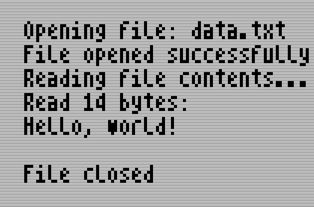
    printf("Opening file: data.txt\n");

    // Open file for reading using open() from spdos.h
    // Works with any mounted filesystem (XFS, TNFS, etc.)
    // O_RDONLY = read only, O_WRONLY = write only, O_CREAT = create if missing
    int fd = open("data.txt", O_RDONLY, 0);
    if (fd < 0)
    {
        printf("Failed to open file\n");
        return 1;
    }

    printf("File opened successfully\n");
    printf("Reading file contents...\n");

    // Read file data using read()
    char buffer[256];
    ssize_t bytes_read = read(fd, buffer, sizeof(buffer) - 1);

    if (bytes_read <= 0)
    {
        printf("Failed to read file or file is empty\n");
        close(fd);
        return 1;
    }

    // Null-terminate the buffer for printing
    buffer[bytes_read] = '\0';

    printf("Read %d bytes:\n", (int)bytes_read);
    printf("%s\n", buffer);

    // Close file using close()
    close(fd);
    printf("File closed\n");

    pageout();

    return 0;
}
Code Explanation
Step-by-Step Breakdown
-
Initialization
pagein();Pages in Spectranext memory space. Required before using any Spectranext functions, including filesystem operations. Without calling
pagein(), file operations will fail because the filesystem drivers are not accessible. -
Open File
int fd = open("data.txt", O_RDONLY, 0);Opens a file using SPDOS
open():- Filename:
"data.txt"(relative to mounted filesystem root) - Flags:
O_RDONLY(read),O_WRONLY(write),O_RDWR(read-write),O_CREAT(create if missing),O_TRUNC(truncate) - Mode: File permissions (typically
0or0644for regular files) - Returns file descriptor (non-negative integer) on success,
-1on error - Works with XFS or TNFS filesystems that are already mounted
- Filename:
-
Read File
ssize_t bytes_read = read(fd, buffer, sizeof(buffer) - 1);Reads data from the file:
- File descriptor:
intfromopen() - Buffer: Destination buffer
- Size: Number of bytes to read
- Returns number of bytes read (0 = EOF, -1 = error)
- File descriptor:
-
Close File
close(fd);Closes the file and frees resources.
Key Concepts
libspdos vs ndos
libspdos provides direct SPDOS file operations (open, read, write, close) that work with Spectranet VFS (Virtual File System):
- Uses direct SPDOS functions:
open(),read(),write(),close(),lseek(), etc. - Works with any mounted filesystem supported by Spectranet VFS:
- XFS - Local filesystem with temporary RAM and committed flash layers
- TNFS - Network filesystem
- Other VFS-compatible filesystems
- Filesystems must be mounted (typically done automatically or via BASIC commands)
- Provides file descriptor-based API (similar to POSIX)
ndos provides standard C library functions but will NOT work with all Spectranet filesystems.
Filesystem Mounting
Filesystems must be mounted before accessing files. This is typically done:
- Automatically on boot - XFS may be auto-mounted
- Via BASIC commands -
%mount "xfs://ram/"for RAM, or%mount "tnfs://server"for TNFS. If you need to choose the slot explicitly or keep BASIC compatibility with Spectranet, use the full form instead. For manual slot selection, mount point 3 is preferred for business/app use alongside RAM on 0; see Filesystem overview: mount points - Programmatically - Using
mount()function
Supported Filesystems:
-
XFS - Local overlayed filesystem
- Mount path:
"xfs://ram/" - Access files uploaded via the Spectranext Browser or SPX tools
- No network required, fast local access
- Uploaded files are temporary until committed to flash
- Mount path:
-
TNFS - Network filesystem
- Mount path:
"tnfs://server.domain"or"server.domain" - Access files over network from TNFS server
- Requires WiFi connection
- Mount path:
Once mounted, libspdos works transparently with any of these filesystems - your code doesn't need to know which filesystem is being used.
Use Cases
Dynamic Content Loading from TNFS
One powerful use case is loading additional content for your programs dynamically from a TNFS server.
Example:
// Load a sprite from TNFS server
int sprite_fd = open("sprites/enemy1.spr", O_RDONLY, 0);
if (sprite_fd >= 0)
{
    read(sprite_fd, sprite_buffer, SPRITE_SIZE);
    close(sprite_fd);
    // Use sprite_buffer in your game
}
Temporary Storage with XFS
The XFS filesystem (xfs://ram/) is perfect for temporary storage when working with large amounts of data. Normal writes go to the RAM layer, so scratch files are fast and can be deleted when done. Use the Browser's Commit To Flash button or spx commit <path> only for files that should persist.
Example workflow:
// 1. Download large file to XFS RAM
int download_fd = open("temp_data.bin", O_WRONLY | O_CREAT | O_TRUNC, 0644);
// ... download data and write to file ...
write(download_fd, data_buffer, data_size);
close(download_fd);

// 2. Process the data multiple times
for (int pass = 0; pass < 3; pass++)
{
    int data_fd = open("temp_data.bin", O_RDONLY, 0);
    // Process data...
    close(data_fd);
}

// 3. Clean up when done
unlink("temp_data.bin");
Building and Running
-
Prepare files (depending on filesystem):
- For XFS: Upload files using the Spectranext Browser or SPX tools
- For TNFS: Ensure files are available on TNFS server
-
Mount filesystem (if not auto-mounted):
%mount "xfs://ram/"        ; For local XFS
; or
%mount "tnfs://server" ; For TNFS -
Build the project:
cmake -B build
cmake --build build -
Upload to device:
cmake --build build --target file_io_example_upload_tap -
Run on Spectrum:
%load ""
Next Steps
- XFS Filesystem - Learn more about XFS
- Setting Up Mounts - Configure TNFS and HTTP(s) filesystem mounts
- SDK Documentation - Learn more about the SDK
- Explore other libspdos functions:
write(),lseek(),mkdir(),opendir(),readdir(),closedir()