Getting Started with Spectranext
Spectranext is a modern network cartridge for the ZX Spectrum that provides internet connectivity and file system access. It is 100% backwards-compatible with the original Spectranet while adding modern features like WiFi, TLS/SSL support, and improved performance.
What is Spectranext?
Spectranext brings modern networking capabilities to your ZX Spectrum:
- Wifi Connectivity: Connect to WiFi networks and access the internet
- Secure Connections: Support for HTTPS/TLS encrypted connections
- Development Tools: Debug your Spectrum programs with integrated debugging support
- Backwards Compatibility: Works with all existing Spectranet software
Hardware Requirements
+2/+3 machines are not physically compatible on the Edge port of ZX Spectrum.spectranext
Make sure you set the special switch Spectranext has into correct position:
<+3for +2/+3 devices48k>for 48k/128k devices
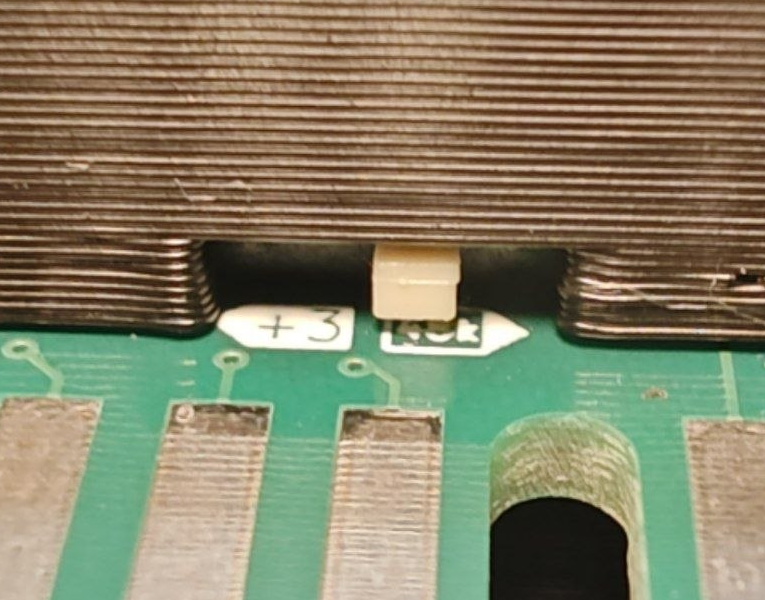
Failure to set the switch correctly has potential to strain VIDEO pin on 48k, with potential breakage.
- ZX Spectrum (48K, 128K, +2, +2A, +3, or compatible)
- Spectranext cartridge (inserted into expansion port)
- USB-C cable for advanced communication with console interface (optional)
- WiFi network for internet connectivity
Emulation
You can install FuseX emulator with Spectranext support from Emulation Page on the main site.
- Install FuseX emulator.
- Enable Spectranext cartridge if not already
- Enable Advanced debugger (gdb server)
Note: SDK can natively talk to FuseX emulator automatically, much like real hardware.
First Boot
Spectranext is ready to use on first boot. After firsr boot, you would need to
Loading a test program
This example will load a small demo program that makes an HTTPS request into CloudFlare:
%mount "https://spectranext.net/test/web/"
%load ""
%mount "<url>" is a Spectranext-only BASIC shortcut. It mounts the URL into a free slot and switches %fs to that slot automatically, so the %load "" above works without an extra %fs command.
This shorthand is not available on the original Spectranet. If you want BASIC compatibility with Spectranet in your program you share with others, use the full form %mount <slot>, "<url>" + %fs <slot>.
For program-loading HTTPS trees, slot 1 is still the usual manual choice.
For general business or app file access (TNFS, HTTPS data, etc.), prefer mount point 3 when using the full explicit form. See Filesystem overview: mount points.
Programming for Spectranext
- Check the SDK documentation for programming details.