HTTPS Request
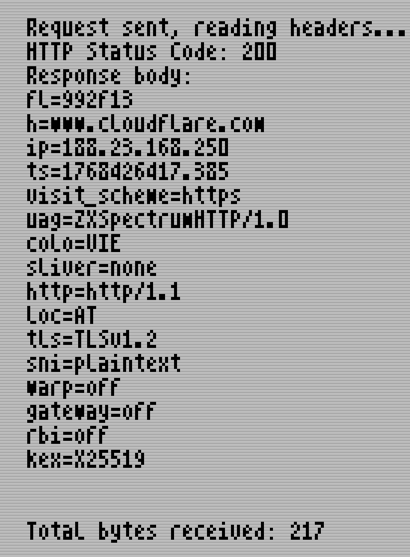
This guide shows you how to create a CMake project, link the Spectranext SDK, and make HTTPS requests using the httplib library. We'll create a program that fetches data from https://www.cloudflare.com/cdn-cgi/trace.
Prerequisites
- Spectranext SDK installed and sourced (see SDK Setup)
- Spectranext hardware connected and WiFi configured
- Basic C programming knowledge
Project Setup
1. Create Project Directory
Create a new directory for your project:
mkdir https-example
cd https-example
2. Create CMakeLists.txt
Create a CMakeLists.txt file in your project directory:
cmake_minimum_required(VERSION 3.16)

# Import Spectranext SDK - MUST be before project()
include($ENV{SPECTRANEXT_SDK_PATH}/cmake/spectranext_sdk_import.cmake)
spectranext_sdk_init()

project(https_example C)

add_executable(https_example main.c)

target_compile_options(https_example PUBLIC -debug)
target_link_libraries(https_example PUBLIC
    -llibspdos
    -llibspectranet_np
    -llibsocket_np
    -llibhttp
)
target_link_options(https_example PUBLIC -debug -create-app)

# Set boot BASIC program (optional)
# This creates a boot.zx file that will be uploaded before your program
spectranext_set_boot("
10 %tapein \"https_example.tap\"
20 LOAD \"\"
")

# Add convenience targets (upload_bin, upload_tap, etc.)
spectranext_add_extra_outputs(https_example)
Important Notes:
spectranext_sdk_init()must be called beforeproject()- This sets up the CMake toolchain- Required libraries:
libspectranet- Core Spectranext functionalitylibsocket- Socket networking supportlibhttp- HTTP/HTTPS client libraryllibspdos- Filesystem support, should you need it
-debugflag - Enables debug symbols for easier debugging-create-app- Creates a.tapfile suitable for loading on Spectrum
3. Configure and Build
# Configure the project
cmake -B build

# Build the project
cmake --build build

# Upload to device (optional)
cmake --build build --target https_example_upload_tap
Complete Code Example
Create main.c with the following code:
#include <stdio.h>
#include <sys/socket.h>
#include <spectranet.h>
#include <http.h>
#include <malloc.h>

// Initialize heap for malloc (required by httplib)
long heap = 0;
char heap_data[4096];

int main()
{
    // Page in Spectranext memory
    pagein();

    sbrk(heap_data, sizeof(heap_data));

    printf("Making HTTPS request to Cloudflare...\n");

    // Set up URI structure
    URI uri = {
        .proto = PROTO_HTTP,              // Protocol (HTTP/HTTPS)
        .host = "www.cloudflare.com",     // Hostname
        .port = 443,                       // HTTPS port (automatically enables TLS)
        .location = "/cdn-cgi/trace",     // Path on server
        .user = NULL,                      // Username (for HTTP auth, if needed)
        .passwd = NULL                    // Password (for HTTP auth, if needed)
    };

    // Make GET request - returns socket file descriptor
    int sockfd = request(GET, &uri);

    if (sockfd < 0)
    {
        printf("Failed to make request: %d\n", sockfd);
        printf("Error codes: EHTTP_SOCKFAIL=%d, EHTTP_DNSFAIL=%d, EHTTP_CONNFAIL=%d\n",
               EHTTP_SOCKFAIL, EHTTP_DNSFAIL, EHTTP_CONNFAIL);
        return 1;
    }

    printf("Request sent, reading headers...\n");

    // Read HTTP response headers
    int http_code;
    int code = readHeaders(sockfd, &http_code);

    if (code < 0)
    {
        printf("Failed to read headers: %d\n", code);
        sockclose(sockfd);
        freeheaders();
        return 1;
    }

    printf("HTTP Status Code: %d\n", http_code);
    printf("Response body:\n");

    // Read response data
    char rxbuf[512];
    int totalbytes = 0;
    int bytes;

    while ((bytes = readData(sockfd, rxbuf, sizeof(rxbuf) - 1)) > 0)
    {
        rxbuf[bytes] = '\0';  // Null-terminate for printing
        printf("%s", rxbuf);
        totalbytes += bytes;
    }

    printf("\n\nTotal bytes received: %d\n", totalbytes);

    // Clean up
    sockclose(sockfd);
    freeheaders();

    printf("Done!\n");

    pageout();

    return 0;
}
Key Concepts
Automatic TLS/HTTPS
When you connect to port 443, Spectranext automatically:
- Detects the HTTPS connection
- Performs TLS handshake with the server
- Validates server certificates
- Encrypts/decrypts all data transparently
No special code required - just use port 443 and the encryption happens automatically. See TLS/HTTPS Sockets for more details.
Next Steps
- SDK Documentation - Learn more about the SDK
- TLS/HTTPS Sockets - Understand TLS encryption
- Socket APIs - Lower-level socket programming