Logging and terminal stdout
When you run a program on the Spectrum, Spectranext can show its printf/terminal output on your computer—while USB is connected, lines appear in the web tools or wherever you’re connected (see Syncing with Computer).
Viewing logs on Emulators
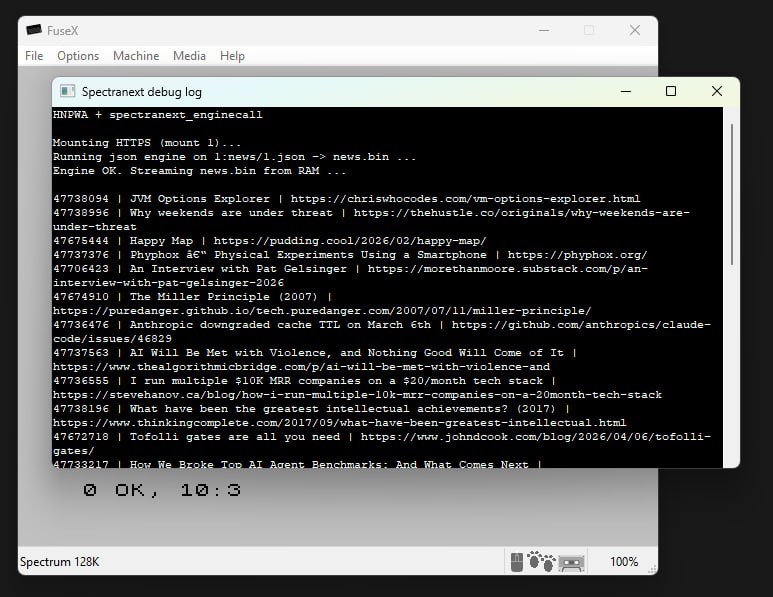
FuseX Emulator can show debug logs from your program out of the box.
Windows
Select "Machine -> Debug Logs"
Mac OS
To view logs on FuseX on Mac, start Fuse from command line:
/Applications/FuseX.app/Contents/MacOS/FuseX
And any log the Fuse produces will appear in standard output.
Logging architecture
End-to-end, logging looks like this:
- Your program prints — for example a C program calls
printfwithlibtermlinked, which eventually needs to send each character somewhere. - libterm turns that into I/O — the library sends those characters with
OUTinstructions to a fixed I/O port ($043B). Assembly or other code can write the same port directly; you don’t have to use C. - Spectranext records it — firmware on the cartridge captures those port writes and appends the bytes to a special file on the device:
/stdout(a normal file in the cartridge's XFS RAM layer). - Your computer receives it — when USB is connected, another part of the firmware reads
/stdout, forwards the text to the host, and clears what was delivered. You see the same text on your PC without doing anything extra.
Writing to /stdout yourself: Anything that ends up in /stdout is treated the same way.
There is no separate “logging opcode” in BASIC—you can open that file by name (e.g. "stdout") and PRINT # to it,
and it will show up on the host when connected, just like output that came from the I/O port via libterm.
I/O port
For assembly or hand-written I/O, send each byte with OUT (c), a and bc = $043B.
Using libterm from C (z88dk)
Link libterm and use normal printf. For full linker options (including libndos / libspdos and fputc_cons redirect), see the libterm API page.
target_link_options(myprogram PUBLIC
    -pragma-redirect:fputc_cons=spectranext_fputc_cons
)
target_link_libraries(myprogram PUBLIC
    -llibterm
    -lndos
    -llibspectranet
)
#include <stdio.h>

int main(void)
{
    printf("Hello from the Spectrum\n");
    return 0;
}
The libterm printf example under spectranext-examples/libterm-printf in the examples repository is a full CMake project you can copy.
Examples: C, assembly, and BASIC
- C
- Assembly
- BASIC
With libterm linked, printf is enough.
#include <stdio.h>

int main(void)
{
    printf("via printf\n");
    return 0;
}
Send one character in A through the terminal stdout port:
    ; Character to send in A
    ld      a, 'H'
    ld      bc, $043B
    out     (c), a

    ld      a, 'i'
    out     (c), a

    ld      a, 13       ; newline
    out     (c), a
With Spectranext paged in and your filesystem mounted, you can open stdout for writing:
10 %fopen #5, "stdout", "w"
20 PRINT #5; "Hello from BASIC"
30 %close #5
Use stream numbers from 4 upward (#0–#3 are reserved for the system). With USB connected, output shows on your computer like other terminal text.
If stdout isn’t available in your build, use OUT (c), a with bc = $043B, or libterm from C.
Summary
| Mechanism | Use case |
|---|---|
libterm + printf | C with z88dk |
OUT (c), a with bc = $043B | Assembly |
%fopen / PRINT # to "stdout" | BASIC |
| USB connected | Output appears on your computer in real time |