Overlayed Filesystem
Spectranext's local XFS filesystem is made from multiple storage layers that appear as one directory tree:
- System ROMFS: built-in, read-only files shipped with the firmware.
- RAMFS: 4MB of temporary storage backed by PSRAM.
- Flash: 4MB of persistent storage in external flash.
- USB storage: a connected USB drive on hardware with USB host support.
You do not mount these layers separately. The normal local filesystem mount, xfs://ram/, exposes them at once.
%mount "xfs://ram/"
%cat
The result is an overlayed filesystem: built-in system files, committed flash files, and temporary RAM files are shown together, opened through the same paths, and used through the normal Spectranet VFS calls.
Why These Layers?
RAMFS is fast and disposable. It is good for quick iteration, test output, downloads, generated data, and program scratch files. Without a USB drive, files uploaded from your computer are temporary by default.
USB storage keeps files on a removable drive. When a drive is available, it takes priority and new files and uploads go there. See USB storage for connection, mounting, and safe ejection.
Flash is permanent. When a file should survive reset or power loss, commit it to flash. This is useful for favorite TAP files, tools, configuration generated by your own programs, or anything you want ready at a moment's notice.
ROMFS is built into the firmware. It is used for files Spectranext itself provides, such as bundled tools under /sys. These files are always available after boot and do not consume your writable RAM or flash storage.
Lookup Rules
When a program reads or stats a path, XFS checks the overlay from top to bottom:
- If a USB drive is available and the path exists there, the USB version is used.
- Otherwise, if the path exists in RAM, the temporary version is used.
- Otherwise, if the path exists in flash, the committed version is used.
- Otherwise, if the path exists in ROMFS, the built-in version is used.
- If it exists in no layer, the operation returns a normal not-found error.
Directory listings merge the layers. When the same file exists in more than one layer, USB takes priority, followed by RAM, flash, and the built-in version.
Built-In Files and Folders
Some folders are supplied by Spectranext and are read-only from the user's point of view. The most visible one is:
/sys
This folder contains bundled programs and utilities. For example, the built-in Spectrum-side file browser is loaded from there by the launcher and by %browser.
You can list and read files from a built-in folder just like any other XFS path:
%cat "/sys"
%tapein "/sys/browser.tap" : LOAD ""
The system copy itself is read-only, but you can replace a system file at the same path. XFS creates your replacement on USB when available, or in RAM otherwise, above the built-in copy. For example, uploading a new /sys/browser.tap makes that version run immediately.
A RAM replacement is temporary: it disappears after reset or power loss unless you commit it to flash. A USB replacement remains on the drive; ejecting the drive reveals the onboard version again.
System directories remain system directories even when XFS creates a small RAM shadow directory to hold a replacement. Removing one is prevented; deleting the replacement file is the way to restore the bundled file before reboot.
Use another folder for files that are not intended to replace a built-in file, such as the root directory or a folder you create yourself:
%mkdir "games"
Write Rules
Creating or uploading notes.txt writes it to USB when a drive is available, or to temporary RAM otherwise. Creating a file at the same path as a built-in or committed file creates a replacement in that writable layer.
The parent directory must already exist in the visible filesystem. XFS can create its RAM shadow when that parent comes from flash or ROMFS, but it never creates missing intermediate directories automatically.
Deleting a RAM replacement reveals the flash or system file underneath it. Deleting a built-in file that has no replacement is not allowed.
Committing Files
Committing copies a file or directory from RAM to flash and removes the RAM source. After that, the same path remains visible through the same mount, but it is backed by persistent storage.
Files written to USB already persist on the drive and do not need committing. If a USB file hides a RAM file at the same path, eject the drive before committing the RAM version.
The CHMOD commit attribute
The commit operation is exposed through the existing Spectranet VFS CHMOD syscall rather than through a new filesystem syscall. For the local XFS overlay, a mode with bit 15 set—$8000 (32768)—means commit this RAM-backed path to flash. It is an XFS extension, not a Unix permission bit.
; A = XFS mount point, HL = NUL-terminated path, DE = $8000
; call CHMOD
The overlay directs this operation to the layer containing the visible file. For a RAM-backed path, a successful commit copies the complete file or directory tree to flash, then removes the RAM source, revealing the same path from its persistent layer. Committing to onboard flash applies to RAM-backed paths; it does not copy USB files into flash or make an arbitrary remote VFS mount persistent.
- Browser
- BASIC
- C
- spx
Open the Spectranext File Browser, upload the files you want, select a temporary file, and click Commit To Flash.
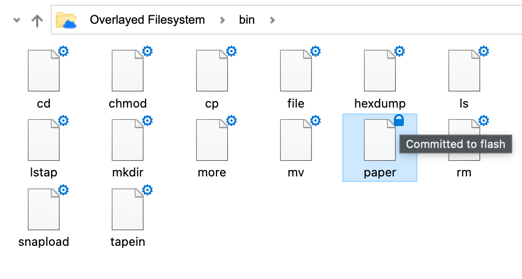
Committed files are shown with a storage indicator in the file list.
%chmod "game.tap", 32768
The value 32768 is the Spectranext XFS commit flag. It is passed through the existing Spectranet VFS CHMOD operation.
#include <spdos.h>

fscommit("game.tap");
Or call chmod() directly:
chmod("game.tap", SPDOS_CHMOD_COMMIT_FLASH);
spx commit game.tap
Example Workflow
With no USB drive connected:
- Upload
game.tapfrom the Browser or withspx; it is stored in RAM. - Run it from XFS while iterating. You may also upload it over a bundled system file to test a replacement.
- When it is worth keeping, commit it to flash.
- Keep using the same filename and the same mount point. A committed replacement continues to hide the bundled version after a reboot.
There is no /flash directory, no separate persistent mount, and no change required in programs that already open files from XFS. Built-in system files simply appear at their normal paths.
Storage State
XFS reports the source of a listed or statted entry. Tools use this to show whether a file is temporary, committed, or part of the system.
0: RAM-backed temporary file.1: Flash-backed committed file.2: Built-in system file or system directory.3: File or directory on USB storage.
This state is metadata about the visible overlay entry, not part of the filename. A replacement file reports its USB, RAM, or flash storage; a system directory remains a system directory while it contains replacements.