Hardware Components
Spectranext consists of several key hardware components that work together to provide networking and file system capabilities to your ZX Spectrum.
Main Components
RP2350 Microcontroller
The RP2350 is the main microcontroller unit (MCU) that serves as the primary processor for Spectranext. It handles:
- ROM Emulation: Emulates the Spectranet ROM for backwards compatibility
- W5100 Emulation: Emulates the W5100 Ethernet controller chip that was present in the original Spectranet hardware. Unlike the original Spectranet which had a physical W5100 chip, Spectranext implements the W5100 register interface in software, allowing full backwards compatibility with existing Spectranet software while using modern Wi-Fi connectivity
- XFS Filesystem: Manages the RAM-based filesystem accessible from Spectrum programs
- USBFS: Provides USB file transfer capabilities over USB-C
- Socket Management: Manages network sockets and connections
- TLS/SSL Processing: Handles encrypted connections (HTTPS)
- Debugging Support: Provides GDB stub for debugging Spectrum programs
The RP2350 runs FreeRTOS and coordinates all major functions of the cartridge.
ESP32-C3 Wi-Fi Module
The ESP32-C3 is a dedicated Wi-Fi coprocessor that handles:
- Wi-Fi Connectivity: Manages wireless network connections
- Network Stack: Implements TCP/IP networking protocols
- Socket Communication: Provides network socket interface to RP2350
The ESP32-C3 communicates with the RP2350 via a serial interface, allowing the main MCU to focus on Spectrum-specific tasks while the Wi-Fi module handles network operations.
PSRAM Chip
The PSRAM (Pseudo-Static RAM) chip provides additional memory for:
- Temporary File Storage: Stores files uploaded via USBFS
- XFS Filesystem: Provides storage space for the RAM-based filesystem accessible from Spectrum programs
- Buffers: Used for file transfers, network operations, and other temporary data
Files stored in PSRAM are accessible via the XFS filesystem (xfs://ram/) from Spectrum programs. Note that PSRAM contents are cleared on power cycle.
Flash Chip
The Flash chip stores:
- Firmware: Contains the Spectranext firmware and bootloader
- Persistent Configuration: Stores WiFi credentials and other settings
- OTA Updates: Used for over-the-air firmware updates
The flash chip provides non-volatile storage that persists across power cycles.
Voltage Level Buffers
Voltage level buffers convert signals between:
- ZX Spectrum: Operates at 5V logic levels
- Modern Components: RP2350, ESP32-C3, and other components operate at 3.3V
These buffers ensure safe and reliable communication between the Spectrum's 5V bus and the 3.3V components, protecting both the Spectrum and modern electronics.
User Interface Components
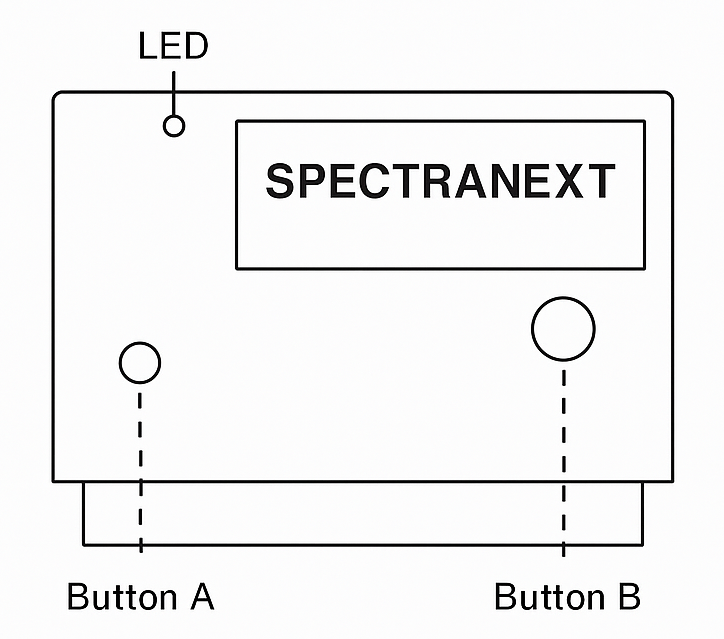
Status LED
A single LED provides visual feedback about Spectranext's status:
- Power On: Indicates the cartridge is powered
- Status Indicators: Blinks or changes pattern to indicate various states (WiFi connection, activity, errors, etc.)
- Activity: Shows network or file transfer activity
The LED helps you quickly assess the cartridge's operational status without needing to check the console interface.
B: Magic Button (Large)
The Magic Button is a large, easily accessible button that provides:
- Quick Actions: Can be used for various functions depending on firmware implementation
- User Interaction: Provides a way to interact with the cartridge without using the Spectrum keyboard
The button's exact function may vary depending on the firmware version and current mode.
A: Factory Reset Button (Tiny)
The Factory Reset Button is a small, recessed button used for:
- UF2 Boot Mode: Triggers USB bootloader mode for firmware updates
- Recovery: Allows recovery from firmware issues
- Factory Reset: Resets configuration to defaults
This button is only functional when device is powered off and would not affect operation otherwise. It's used only for firmware updates and recovery scenarios.
Connectivity
USB-C Port
The USB-C port provides a unified interface for:
- Console Interface: Access to the command-line console for configuration and debugging
- File Transfer: Upload/download files via RSP protocol (using SPX tools or web browser)
- GDB Debugging: Debug Spectrum programs using GDB (automatically switches to debugger mode when GDB connects)
- Power: Spectranext can be powered on without spectrum, if you want to configure it or upgrade its software without Spectranext being plugged into ZX Spectrum.
- Firmware Updates: Used for firmware updates via UF2 bootloader mode
The USB-C connection exposes a single CDC interface named "spectranext" that dynamically handles console, file transfer, and debugging operations. This unified interface makes configuration, file transfers, and debugging much easier than using only the Spectrum interface.
Component Interaction
All components work together to provide a seamless experience:
- RP2350 coordinates operations and interfaces with the Spectrum
- ESP32-C3 handles Wi-Fi connectivity and network operations
- PSRAM provides temporary storage for files and data
- Flash stores firmware and configuration persistently
- Buffers ensure safe voltage level conversion
- LED provides visual feedback
- Buttons allow user interaction
- USB-C enables computer connectivity
Next Steps
- Getting Started - Set up your Spectranext cartridge
- Connecting to WiFi - Configure network connectivity
- Navigating Resources - Learn about file management